
|

|
|
|
|
Program type: Freeware File size: 7793 Kb Date: 09/23/2014 Homepage Install support: Install and Uninstall OS: Win7 x32, Win7 x64, Windows 8 Requirements: 1Ghz or higher processor, 1GB of RAM, 20MB of Hard Drive space, Internet Access Language: English, Chinese, ChineseTraditional, Danish, Dutch, French, German, Greek, Hungarian, Italian, Japanese, Korean, Polish, Portuguese, Russian, Spanish, Turkish | Start menu and cheap start screen or the start button, good windows 8 or also modern apps, windows 7 and desktop apps or free launcher and cheap Microsoft Windows or the start menu reviver, good start menu reviver 2 or also windows 8 start | Start Menu Reviver 2.5.0.18 [Homepage] - by: ReviverSoft - Download links for Start Menu Reviver 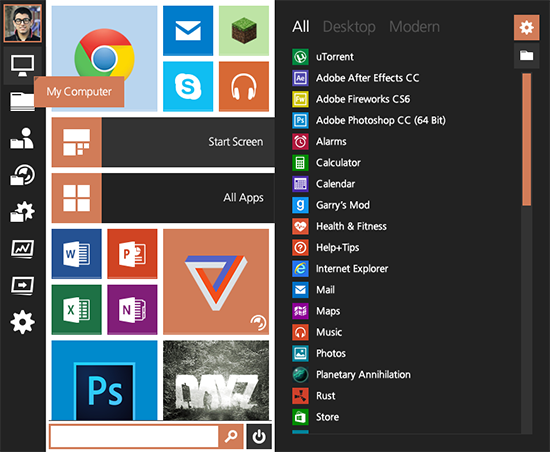 Click to enlarge Description: Start Menu Reviver is an innovative application that adds a Start Menu to Windows 8 PCs and enhances the Start Menu on Windows 7 PCs. Start Menu Reviver is the only Start Menu utility to revive the Microsoft Windows Start menu, not just replace it. It restores the traditional launchpad functionality that is obviously missing in Windows 8, AND fully complements Microsofts new Windows vision by being truly touchscreen friendly. Start Menu Reviver also offers true customization and versatility like no other product available on the market. Truly Touchscreen-Friendly: The unique tile structure in Start Menu Reviver means that it is the only Start Menu that is truly touch-friendly. Of course, you can still use your mouse and keyboard, but with Start Menu Reviver you can also easily add, remove, move and edit at the touch of a finger. Start Your Way: Start Menu Reviver accommodates up to 32 tiles so you can customize it for a truly personal experience. Choose which applications, documents, folders and more you want to launch directly from your Start Menu. You can also change the tile images using our ever-growing library of icons, or create your very own. Manage Desktop and Modern Applications: Launch both traditional desktop programs and new Windows 8 modern applications directly from the Start Menu. No other product allows you to do this. Powerful Search: The search box in Start Menu Reviver is a one stop shop for finding anything on your computer. It will help you find applications, computer settings and documents in a matter of seconds. Access the Start Screen: If you still want to access the Windows 8 Start screen, you can see it and access it directly in Start Menu Reviver. You can even see how it looked the last time you were there. Make a Website Tile: Start Menu Reviver doesnt just let you add desktop and modern applications as tiles, you can also make tiles to quickly access your favorite websites and even your favorite documents. Recent changes in this Major Update: Remarks - Comments - Reviews (Add your opinion about this program) |
See also in Utilities and Hardware: Launchers
|
|


 Download:


