
|

|
|
|
|
Program type: Freeware File size: 4466 Kb Date: 10/14/2017 Homepage Install support: Install and Uninstall OS: Win2000, WinXP, Win7 x32, Win7 x64, Windows 8, Windows 10, WinServer, WinOther, Windows2000, Windows2003, Windows Server 2012, Windows Tablet PC Edition 2005, Windows Media Center Edition 2005, WinVista, Windows Vista Starter, Windows Vista Home Basic, Windows Vista Home Premium, Windows Vista Business, Windows Vista Enterprise, Windows Vista Ultimate, WinVista x64, Windows Vista Home Basic x64, Windows Vista Home Premium x64, Windows Vista Business x64, Windows Vista Enterprise x64, Windows Vista Ultimate x64 Requirements: Windows Vista/7/8/10 Language: English | copy, good move or also file, folder and speed or free fast and cheap recovery or the error, good explorer or also verify, checksum and shell or free context and cheap menu or the RIPEMD, good Tiger or also Whirpool, xxHash | TeraCopy 3.26 [Homepage] - by: Code Sector - Download links for TeraCopy 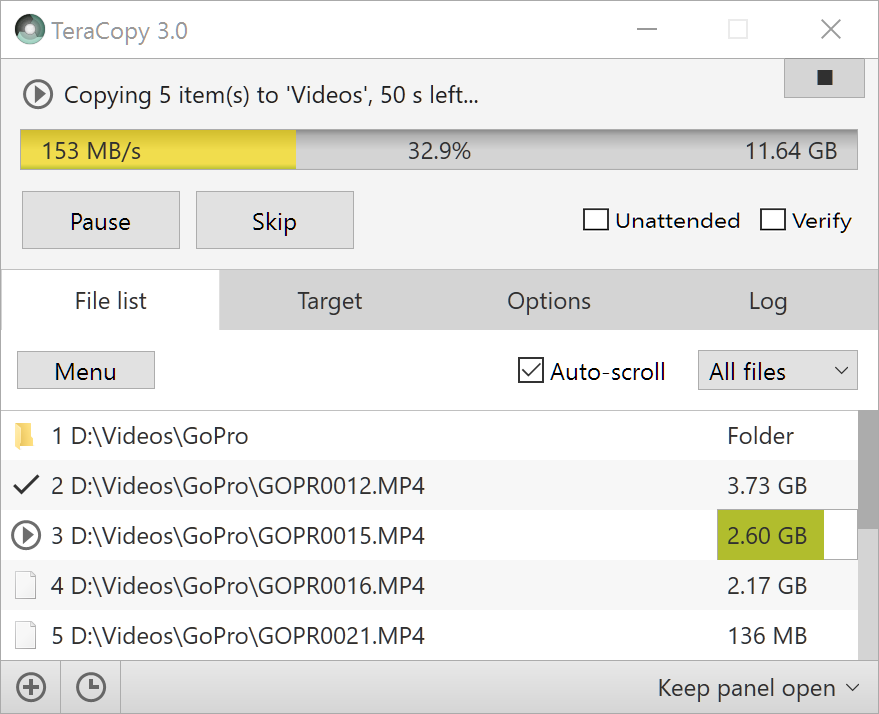 Click to enlarge Description: TeraCopy is a free utility designed to copy files faster and more secure. It automatically switches between synchronous and asynchronous modes to improve the speed of file transfers. File verification: TeraCopy can test files after copy to ensure they are identical. This is done by comparing hashes of source and target files. Error recovery: in a case of a copy error, TeraCopy will try to recover and, in the worse case scenario, will simply skip the file, not terminating the entire transfer. Create and verify checksum files: all popular formats are supported, including MD5, SHA, RIPEMD, Tiger, Whirpool and xxHash. Interactive file list: TeraCopy shows the failed file transfers and lets you fix the problem and recopy only the problem files. You can also remove unnecessary files or folders to reduce the transfer time. Informative progress bar: a speed graph inside the progress bar visually indicates problematic and skipped files using different colors. Shell integration: TeraCopy can completely replace the Explorer copy and move functions, enabling you to work with files as usual. You can also quickly set as target any folder open in Explorer. Recent changes in this Major Update: Remarks - Comments - Reviews (Add your opinion about this program) |
See also in Utilities and Hardware: File and Disk Management
|
|


 Download:


