
|

|
|
|
|
Program type: Freeware File size: 454 Kb Date: 05/10/2010 Homepage Install support: Install and Uninstall OS: WinXP, WinVista, WinVista x64, Win7 x32, Win7 x64, Other, Windows 10, Windows 8 Requirements: Windows XP, framework 3.5 Language: English | LuJoSoft and mouse or free clicker and cheap automation or the utility | LuJoSoft MouseClicker 1.0.0 [Homepage] - by: LuJoSoft - Download links for LuJoSoft MouseClicker 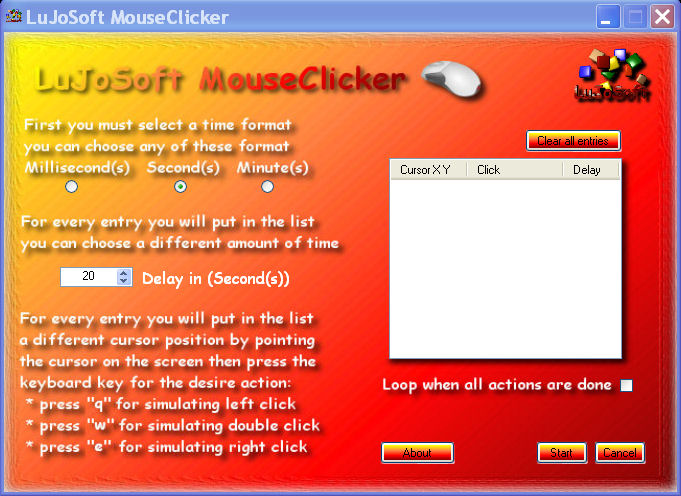 Click to enlarge Description: Introduction LuJoSoft MouseClicker is a simple program that clicks your mouse automatically anywhere on the screen at variable interval. MouseClicker can be used to make repetitive clicking easy, but should not be used to cheat in online-games. You can use it to automate any application or to refresh your webpage How to use: Very simple, 1. You must select a time format you want to use: Millisecond(s) Second(s) Minutes(s) 2. For every entry you will enter you can modify the amount of time of delay for each click in the numeric up and down controle 3. Finaly for every entry you will put in the list you can choose a different location for the clicking to occur just by pointing the cursor on the screen over where you want it to click and then press one of the following key: Press "q" for siulating left click. Press "w" for siulating double click. Press "e" for siulating right click. There is a loop function so it can restart the cycle at the end of the completion of the list. Beware if loop is use in time format in millisecond it could be almost impossible to stop. To cancel any process click on the cancel button or if the application is on top of the other use the Esc key Sytem requirement: Window Xp, windows server, Vista and windows 7. .Net framework 3.5 SP1. Installation: No installation require it's portable. Double click MouseClicker.exe. Then enjoy! Recent changes in this New Release: Remarks - Comments - Reviews (Add your opinion about this program) |
See also in Utilities and Hardware: Automation
|
|


 Download:


