
|

|
|
|
|
File size: 14289 Kb Date: 06/05/2009 Homepage Install support: Install and Uninstall OS: WinXP, Windows2000, Windows2003, Windows Vista Starter, Windows Vista Home Basic, Windows Vista Home Premium, Windows Vista Business, Windows Vista Enterprise, Windows Vista Ultimate, Windows Vista Home Basic x64, Windows Vista Home Premium x64, Windows Vista Business x64, Windows Vista Enterprise x64, Windows Vista Ultimate x64, Mac OS X, Mac OS X 10.4, Mac OS X 10.5 System requirements: RAM 512; Intel Pentium 3+; /G3+; res1024+ Language: English, French, German, Italian, Japanese, Portuguese, Russian, Spanish | graphic program or also plug in, plugin and select or free selection and cheap mask or the masking, good cut out or also tool, sharp edge and images or free photo and cheap remove background | AKVIS SmartMask 2.5 [Homepage] - by: AKVIS Software Inc. - Download links for AKVIS SmartMask 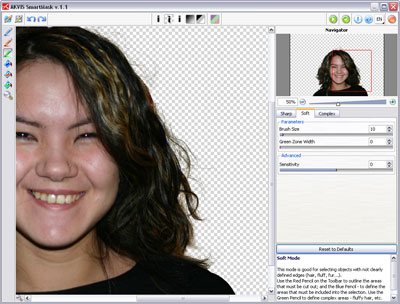 Click to enlarge Description: AKVIS SmartMask is an efficient masking tool that saves you time on complex selections and is fun to use. Never before has selection been so simple! Just draw an outline with the blue pencil inside the objects you want to select (for example, yourself on a group photo), and with the red pencil - some lines outside the object to cut out the background. The program makes the selection you want - understanding where the borders of the object end. There are three modes tailored to different selection types: Sharp, Soft and Complex. For example, in the Soft mode a green pencil is added, that helps you to define difficult parts - fluff, hair, fur. In cases where the selected object stands against a background of a similar color range, or the object's edges are uneven, you can use the touch-up brush in the Complex mode. The program even allows you to get rid of the color tint left on the cutout object by the environment. In most cases objects on a photo are not evenly lighted, the cutout object can have shades and colors reflected from the nearby objects. Such color shades can be absolutely inappropriate on a new background: for example, hair having a blue cast from the sky or a green shade from the trees, shadows of objects on the clothes. This mask tool helps to get rid of the unwanted color shades. Business Use: Making selections takes up much time of the designer's working day. Use of SmartMask considerably increases his/her productivity. Apart from the substantial time and money saving, you will get a content designer, who will be released from the boring work and will have more room for creativity and realization of his ideas. Try the plug-in for 10 days for free! Recent changes in this Major Update: Remarks - Comments (Add a remark about this program) |
See also in Graphic Painting and Drawing: Image Editing
|
|


 Download:


