|
|
|
||||
|
|
Want a better software to manage your Web site more quickly and efficently? Click here for more info about EasyWebEditor...
Websites and CD DVD product catalogs with a single professional tool, in a single step? Yes it is possible: HyperPublish (BELOW!) FREE DOWNLOAD LINKS FOR: WinSleep by MollieSoft 1.4.11.0 WINSLEEP keeps your computer asleep (while not too busy) as much as possible during periods you specify, according to usage limits. ** Provides a detailed time-line graph showing when your computer was awake, asleep, or hibernating. ** Provides convenient Sleep and Hibernate buttons for manual use when desired. **Use remote viewer WinSleep Monitor to connect from anywhere! ** Set wake schedules and an optional task to be run. (description, more information, click here - Sleep based on usage limits. Shows a timeline of sleep and awake periods.) File size: 1276 Kb Free Download link 1: Click here to start the download for WinSleep by MollieSoft (then choose Save) Click here to start the download for WinSleep by MollieSoft (then choose Save)WARNING: we suggest to scan the files with an antivirus before installing them - we do our best to screen each file reviewed on GetSoftware, but we don't re-scan them each day, and so, better safe than sorry! The download link was perfectly working at the time of our review and the related inclusion in this archive, and so when we did our last test; the download is not on our servers, it is provided by the software house and sometimes can be -temporarily- offline or so. Please kindly use the contact form to report difficulties, strange behaviors or persistent problems, and quote the program name or the number 7193 . Windows utility that keeps your computer asleep when it's not busy; a timeline shows when your computer was asleep or awake over the last several days. Define wake timers and tasks. Windows 7, 8.1 or 10. More info at molliesoft winsleep.(Sleep based on usage limits. Shows a timeline of sleep and awake periods.)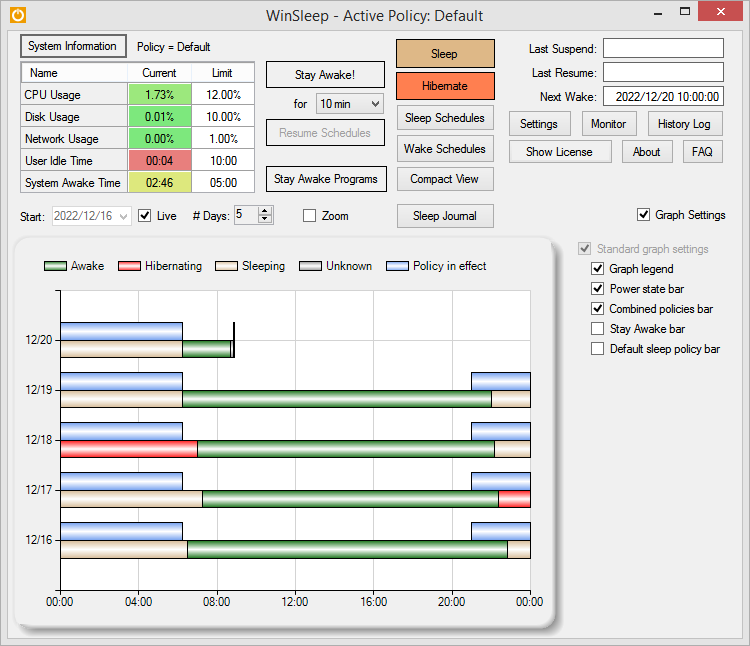 Download page for the app WinSleep by MollieSoft - WINSLEEP by MollieSoft keeps your computer asleep (while not too busy) as much as possible during periods you specify.
** Runs on Windows 7, Windows 8.1 or Windows 10. ** Provides a detailed time-line graph showing when your computer was awake, asleep, or hibernating. ** Sleep Journal shows when/why your computer woke up or went to sleep. ** Provides convenient Sleep and Hibernate buttons for manual use when desired. ** Use remote viewer WinSleep Monitor to connect from anywhere! ** Shows the current CPU/Disk/Network usage percentages for your computer. ** Define multiple sleep schedules (daily, weekly, or monthly time slot), each with a designated sleep policy with its own CPU/Disk/Network usage limits. ** Set wake schedules and an optional task (program) to be run at each wake. ** Helps prolong the life of your desktop computer. Your disk drive is not spinning, motherboard is not powered, fan is not running (and accumulating dust inside the computer casing), and your monitors are in standby mode. ** Saves money! A typical desktop uses 250 watts of electricity when awake, but only a few watts while asleep. Power companies (in the US) may bill at say 10 cents per kWH. This is .25 kWH @ 10 cents = 2.5 cents/hr you are saving while asleep. Say WinSleep sleeps your computer for half the day; this is $.30/day = $109.50 per year. The more you sleep, the more you save. (We didn't even count the power consumption of the computer monitor here.) 
|
||||
|
|


