|
|
|
||||
|
|
Want a better software to manage your Web site more quickly and efficently? Click here for more info about EasyWebEditor...
Websites and CD DVD product catalogs with a single professional tool, in a single step? Yes it is possible: HyperPublish (BELOW!) FREE DOWNLOAD LINKS FOR: Exiland Backup Professional 5.0 Exiland Backup Professional is a simple file backup software that allows you to backup and restore your files. The program includes the interface part (task settings) and the service that runs continuously in background regardless of user sessions (as a Windows service). It is perfectly suited for backing up the data in a local network: work documents, Outlook (*.pst,*.ost) files, websites, user profiles. There is a free version of the program. (description, more information, click here - Exiland Backup will help you protect your important files with automatic backups) File size: 10298 Kb Free Download link 1: Click here to start the download for Exiland Backup Professional (then choose Save) Click here to start the download for Exiland Backup Professional (then choose Save)WARNING: we suggest to scan the files with an antivirus before installing them - we do our best to screen each file reviewed on GetSoftware, but we don't re-scan them each day, and so, better safe than sorry! The download link was perfectly working at the time of our review and the related inclusion in this archive, and so when we did our last test; the download is not on our servers, it is provided by the software house and sometimes can be -temporarily- offline or so. Please kindly use the contact form to report difficulties, strange behaviors or persistent problems, and quote the program name or the number 9467 . Exiland Backup is used to back up files from multiple PCs on a network and synchronize folders on the selected PC with external drives. It is includes the interface part and the service that runs continuously in background regardless of user sessions(Exiland Backup will help you protect your important files with automatic backups)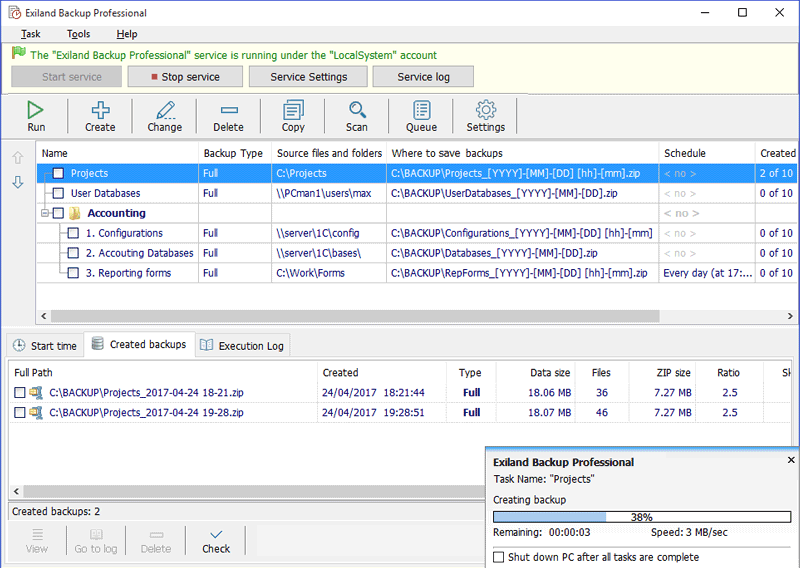 Download page for the app Exiland Backup Professional - Exiland Backup Professional is a full featured edition. It includes all the features of Standard edition and additionally allows you to back up files from multiple PCs on a local network using the specified accounts (logins and passwords), and save backups to any storage locations: local or network drives, FTP/SFTP servers, removable media (such as external HDD or flash drives). Professional edition runs as a Windows service in background without interfering with other programs. Exiland Backup saves your disk space by compressing the files included in backups. It is perfectly suited for backing up the data in a local network: work documents, database files, websites, user profiles, and so forth. You can download a demo version of Exiland Backup to try out before you decide on buying.
MAIN FEATURES - Performs four backup types: full backup, differential backup, incremental backup, and data synchronization - Supports VSS (Volume Shadow Copy) to back up open files: MS Outlook (*.pst,*.ost), etc. - Provides powerful file filters (masks, attributes, excluded subfolders, and so forth) - Fast multi-threaded copying - Has a flexible scheduler - Allows scheduling tasks on PC startup/shutdown or USB device connection and launching tasks manually from Windows command line - Backs up any data: local and network files and folders - Duplicates your backups; - Sends backups as email attachments - Performs standard ZIP compression - Supports AES encryption (128-bit, 192-bit, and 256-bit key strengths) and password protection - Supports Zip64 technology; splits large ZIP archives into multiple volumes - Automatically deletes the oldest backups - Runs third-party programs or commands before/after the execution of a backup task - Restores lost files - Logs all backup operations - Shows backup progress in the Notification Area (System Tray) - Uses three types of notifications (e-mail, Net Send, and on-screen message) 
|
||||
|
|


